April 13, 2026
What the heck is Redis???
Questions I asked when learning Redis.
originally published on Medium ↗
- redis
- caching
- backend
- databases
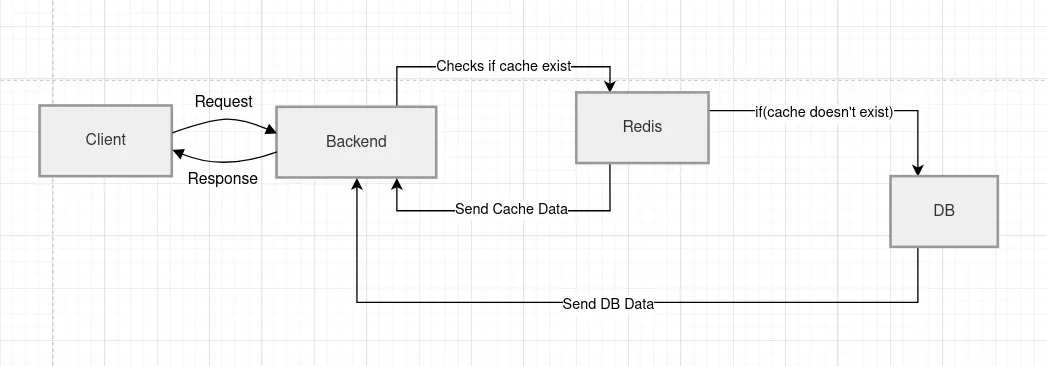
Q: What is Redis?
A:
At first, I got this answer from AI:
“Redis (Remote Dictionary Server) is an open-source, in-memory, NoSQL data structure store used primarily as a database, cache, message broker, and streaming engine.”
And honestly… I was like*, “ What???* I said it to tell me shortly and simply.
Redis is a super fast storage system that keeps data in memory (RAM) instead of disk.
Stores data in a key -> value pair
"name" → "Golden"
"user:1" → { id: 1, name: "Alember" }
🚨 Hiring Tech Talent (Remote + Onsite) 💰 $3K–$10K/Month
Apply once — get your profile in front of thousands of hiring companies in minutes and increase your interview chances.

Q: Isn’t checking Redis before DB an extra operation that slows things down?
A: Redis check (~1 ms) is much faster than DB (~50 ms). Most requests hit cache, so overall it speeds things up despite the small extra step.
Q: Should I use local Redis or an online (managed) Redis?
- Local Redis → best for development (simple, free)
- Managed Redis → best for production (scalable, reliable)
Q: How do we know which data to store in Redis and how much data to store?
A: Store data that is frequently read, slow or costly to fetch, and does not change too often. Store only the minimum useful data, preferably with an expiry time. Cache hot data, not everything.
Q: If DB data changes, what happens to cached data? Will server use cache or DB? What to do?
- Cache may become stale (old data).
- Server will still return cache until it expires or is cleared.
Solutions:
- TTL (expiry): Auto refresh after some time
- Cache invalidation: Delete/update cache when DB changes
- Write-through / write-back: Update cache + DB together
Rule: Always handle cache invalidation, otherwise you’ll serve outdated data.
Q: What is write-through vs write-back?
- Write-through → save to DB + cache together (safe)
- Write-back → save to cache first, DB later (risky)
Write-back → faster but risky (data loss if cache crashes before DB write)
Q: If I save data to both DB and cache in middleware, is it write-back or write-through?
A: It is write-through, because both DB and cache are updated immediately.
Q: If I invalidate cache on create/update/delete, can I increase TTL?
A: Yes. With proper invalidation, you can safely use longer TTL since freshness is maintained by invalidation, not expiry.
Q: Does accessing cached data reset TTL?
A: No. TTL is based on when the cache was set. It only resets if the key is updated again.
Q: What is BullMQ used for?
A: It’s used to run background jobs (like emails, reports, notifications) using Redis, so your app stays fast.
Q: Can BullMQ be used without Redis?
A: No. BullMQ depends on Redis and is not a part of Redis — it runs on top of it.
Q: Can I cache only selected fields, like only amount from invoice/expense/purchase summaries?
A: Yes. You should cache only the minimum useful data needed, not the whole object.
Q: My backend is using Docker, so what should be the Redis URL?
A: If your backend is running inside Docker and Redis is running on the AWS server host machine, use:
Case 1: Redis outside Docker
REDIS_URL=redis://host.docker.internal:6379host.docker.internal does NOT work by default on Linux (works on Mac/Windows only). And in docker-compose.yml, add:
extra_hosts:
  - "host.docker.internal:host-gateway"
Why?
Because inside a Docker container, 127.0.0.1 points to the container itself, not the server host. So the backend container cannot reach host Redis through 127.0.0.1.
Do not use: REDIS_URL=redis://127.0.0.1:6379
Case 2 (Recommended): Redis inside Docker
if Redis is outside Docker and backend is inside Docker.
Better long-term (cleanest architecture) — Run Redis in Docker too
REDIS_URL=redis://redis:6379And in compose:
redis:
  image: redis:alpine
  container_name: test-redis
  restart: unless-stopped
  healthcheck:
    test: ["CMD", "redis-cli", "ping"]
    interval: 10s
    timeout: 5s
    retries: 5
 #ports:
 #  - "6379:6379"
I didn’t put the port to avoid a conflict with the Redis service already running on my host machine’s port 6379, while still allowing the backend to connect internally within the Docker network.
Q: Will Redis cache be cleared when I redeploy/restart server?
A: No, unless Redis itself restarts or is not persistent. Cache usually survives app restarts.
Q: Without a Redis volume in Docker Compose, will cache reset on rebuild/redeploy?
A: Yes, if the Redis container is recreated, the cache will be lost. Only backend restart usually won’t clear it.
For cache use case, losing Redis on deploy is often acceptable. Because cache is temporary by nature.
Q: How to check how much RAM Redis cache is using?
A: Run redis-cli info memory (or via Docker exec) and check used_memory_human.
If using Docker:
docker exec -it container-name redis-cli info memoryQ: Should I set a memory limit for Redis?
A: Yes. For production caching, set a memory limit so Redis does not consume too much RAM.
Q: How do I set it?
A: In Docker Compose, use Redis command options like --maxmemory 256mb --maxmemory-policy allkeys-lru.
redis:
  image: redis:alpine
  container_name: test-redis
  restart: unless-stopped
  command: redis-server --appendonly yes --maxmemory 128mb --maxmemory-policy allkeys-lru
  healthcheck:
    test: ["CMD", "redis-cli", "ping"]
    interval: 10s
    timeout: 5s
    retries: 5
maxmemory 256mb→ Redis can use up to 256 MB RAMallkeys-lru→ when full, remove least recently used keys
Q: Which size to choose?
A: Rough simple rule:
- small app →
128mb - medium app →
256mbor512mb - larger usage → higher after monitoring
Q: What did developers use before Redis?
A: In-memory app cache, database optimizations, file-based caching, and tools like Memcached.
Q: Is there a problem with the cache if Redis says the eviction policy is allkeys-lru but expected noeviction?
IMPORTANT! Eviction policy is allkeys-lru. It should be "noeviction"A: Not necessarily for cache. allkeys-lru is good for caching. But if the same Redis is also used for BullMQ or critical job data, it can be a problem because Redis may evict important keys.
Q: Can I keep Redis at 256MB with allkeys-lru?
A: Yes. It’s fine for caching and won’t fill too quickly for typical ERP usage. Just avoid using the same Redis for critical jobs like queues.
Thank you for being a part of the community
Before you go:

👉 Be sure to clap and follow the writer ️👏️️
👉 CodeToDeploy Tech Community is live on Discord — Join now!
Disclosure: This post includes affiliate and partnership links.
comments