July 16, 2026
Managing a scalable microservices API Gateway using KrakenD
The fastest API Gateway in the market, ready to run on premises, cloud, or hybrid.
originally published on Medium ↗
- api-gateway
- microservices
- krakend
- devops
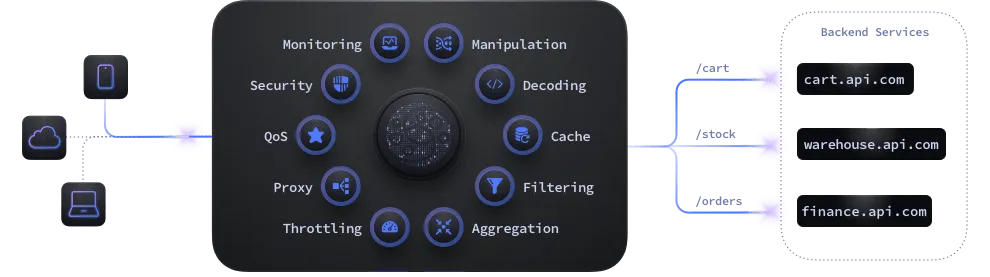
The gateway sits in front of your microservices to provide access control, security, throttling, analytics, and much more. KrakenD is not only a proxy but a Backend for Frontend that can aggregate and transform multiple calls simultaneously, avoiding network traffic and reducing bandwidth consumer to the end-user.
KrakenD can be set up in a single krakend.json file. A single, massive krakend.json with hardcoded backends is an anti-pattern. Pros treat gateway configurations like clean, modular code.
1. The Directory Structure
Instead of one file, we’re splitting gateway configuration by domain, environments, and general settings which keeps it dynamic and organized as well.
├── .env
├── .gitignore
├── docker-compose.yml
└── config/
    ├── krakend.tmpl
    ├── settings/
    │   ├── dev
    |   |   ├── hosts.json
    │   └── prod
    |       └── hosts.json
    └── endpoints/
        ├── products.tmpl
        └── users.tmpl
2. Step-by-Step Implementation
Step 1: Container Orchestration (docker-compose.yml)
Instruct KrakenD to enable Flexible Configuration (FC_ENABLE), declare the directory where your modular endpoint templates live (FC_TEMPLATES), and point to your environment variables (FC_SETTINGS).
services:
  gateway:
    container_name: api-gateway
    image: krakend:2.13.8
    ports:
      - "3000:3000"
    volumes:
      - ./config:/etc/krakend:ro
    environment:
      - FC_ENABLE=1
      - FC_TEMPLATES=/etc/krakend/endpoints
      - FC_SETTINGS=/etc/krakend/settings/dev
    command: ["run", "-c", "/etc/krakend/krakend.tmpl"]
restart: unless-stopped**FC_ENABLE=1**: Tells KrakenD to turn on the template engine.
**FC_TEMPLATES**: Points to the directory containing your modular template files (like your endpoints/ folder).
**FC_SETTINGS**: Points to the file or directory containing your environment variables (like hosts.json).
Step 2: Environment Settings (config/settings/dev/hosts.json)
Use this file to store microservice host URLs and environment-specific strings, keeping them out of your main routing logic.
{
  "hosts": {
    "product_service": "http://product-api:5001",
    "user_service": "http://user-api:5002"
  }
}
Step 3: Modular Endpoints (config/endpoints/users.tmpl)
Define template configurations using standard Go templating.
{
  "endpoint": "/api/auth/register",
  "method": "POST",
  "backend": [{
    "url_pattern": "/api/auth/register",
    "host": ["{{ .hosts.user_service }}"]
  }]
},
{
  "endpoint": "/api/auth/login",
  "method": "POST",
  "backend": [{
    "url_pattern": "/api/auth/login",
    "host": ["{{ .hosts.user_service }}"]
  }]
}
Notice how we reference
**"{{ .hosts.user_service }}"**? At build time, KrakenD compiles this template and automatically swaps that placeholder with the URL from your environment settings file (hosts.json).
Q. What is “endpoint” and “backend”?
- “endpoint” = public route on KrakenD (POST /api/auth/register).
- “backend” = which internal microservice handles it (user-svc:4001).
KrakenD proxies the request from endpoint → backend, applying rate limiting, JWT auth, and circuit breakers along the way.
Q. what is this .tmpl file?
A: **.tmpl** (Template) file is a plain text blueprint containing static configuration mixed with dynamic placeholders (like {{ .hosts.user_service }}).
It leverages Go’s templating engine to act as a flexible skeleton before the final configuration is compiled.
Example:
- Template (
**users.tmpl**):
"host": [ "{{ .hosts.user_service }}" ]2. Variables (**hosts.json**):
{
  "product_service": "http://localhost:5001",
  "user_service": "http://localhost:5002"
}
3. What KrakenD actually runs in memory:
"host": [ "http://localhost:5002" ]Q. "host": [ "{{ .hosts.user_service }}" ] how is it getting the user service url with that?
It works via KrakenD’s **Flexible Configuration(**FC) engine during container startup. It executes in two quick steps:
- The Flag: In your
docker-compose.yml, you setFC_SETTINGS=/etc/krakend/settings/dev. This forces KrakenD to load yourhosts.jsonfile into memory as the core data dictionary. - The Evaluation: As KrakenD compiles the configuration, it encounters the template syntax
{{ .hosts.user_service }}. The dot (.) represents the root of your loadedhosts.jsonfile. It navigates down the keys:hosts→user_service, extracts the string"http://user-api:5002", and replaces the placeholder entirely before compiling the route.
Step 4: The Entrypoint (config/krakend.tmpl)
Tie everything together into the main skeleton. KrakenD will pull the files from your FC_TEMPLATES (defined in docker compose file) directory and compile them here.
{
  "version": 3,
  "port": 8080,
  "timeout": "3s",
  "endpoints": [
    {{ template "products.tmpl" . }},
    {{ template "users.tmpl" . }}
  ]
}
Now let’s go a little bit further: **extra_config**
extra_config helps to enable and configure plugins, middleware, and extended features. It unlocks advanced capabilities such as security, rate limiting, logging and metrics.
krakend.tmpl
{
  "version": 3,
  "port": 8080,
  "timeout": "3s",
  "endpoints": [
    {{ template "products.tmpl" . }},
    {{ template "users.tmpl" . }}
  ],
  "extra_config": {
    "telemetry/logging": {
      "level": "INFO",
      "prefix": "[KRAKEND]",
      "stdout": true
    },
    "security/cors": {
      "allow_origins": ["*"],
      "allow_methods": ["GET", "POST", "PUT", "PATCH", "DELETE"],
      "allow_headers": ["Authorization", "Content-Type"]
    }
  }
}
In krakend.tmpl we are using it for logging and security(to handle cors).
user.tmpl
{
  "endpoint": "/api/auth/register",
  "method": "POST",
  "output_encoding": "no-op",
  "extra_config": {
    "qos/ratelimit/router": { "max_rate": 200, "capacity": 200, "every": "1s" }
  },
  "backend": [{
    "url_pattern": "/api/auth/register",
    "host": ["{{ .hosts.user_service }}"],
    "encoding": "no-op",
    "extra_config": {
      "qos/circuit-breaker": { "max_errors": 10, "interval": 60, "timeout": 30, "name": "cb-users-post-register", "log_status_change": true }
    }
  }]
},
{
  "endpoint": "/api/auth/login",
  "method": "POST",
  "output_encoding": "no-op",
  "extra_config": {
    "qos/ratelimit/router": { "max_rate": 200, "capacity": 200, "every": "1s" }
  },
  "backend": [{
    "url_pattern": "/api/auth/login",
    "host": ["{{ .hosts.user_service }}"],
    "encoding": "no-op",
    "extra_config": {
      "qos/circuit-breaker": { "max_errors": 10, "interval": 60, "timeout": 30, "name": "cb-users-post-login", "log_status_change": true }
    }
  }]
}
configs used in the .tmpl file
- qos/ratelimit/router: 200 request per sec allowed
- qos/circuit-breaker: We’ll talk in detail below.
- output_encoding: “no-op” (endpoint level) : controls how KrakenD merges and returns the response to the client after gathering data from all backends.
- encoding: “no-op” (backend-level) : controls how KrakenD parses/decodes the response coming from that specific backend.
Q. What if i don’t provide output_encoding: “no-op”? how will this affect the response that i’ll get from the backend to api-gateway?
Without **output_encoding: “no-op”**, KrakenD applies its default JSON response wrapping. The response gets reformatted into KrakenD’s standard envelope.
Example — backend returns:
{ “token”: “abc123”, “user”: { “id”: 1, “email”: “a@b.com” } }With “no-op” — client gets exactly that, raw:
200 { “token”: “abc123”, “user”: { “id”: 1, “email”: “a@b.com” } }Without it (default) — KrakenD wraps it:
200 { “content”: { “token”: “abc123”, “user”: { “id”: 1, “email”: “a@b.com” } } }Circuit Breaker
It’s job is to STOP KrakenD from sending requests to a failing service, giving that service time to recover and preventing a total system crash.
"extra_config": {
      "qos/circuit-breaker": {
        "max_errors": 10,
        "interval": 60,
        "timeout": 30,
        "name": "cb-users-post-login",
        "log_status_change": true
      }
}
How above specific setting works
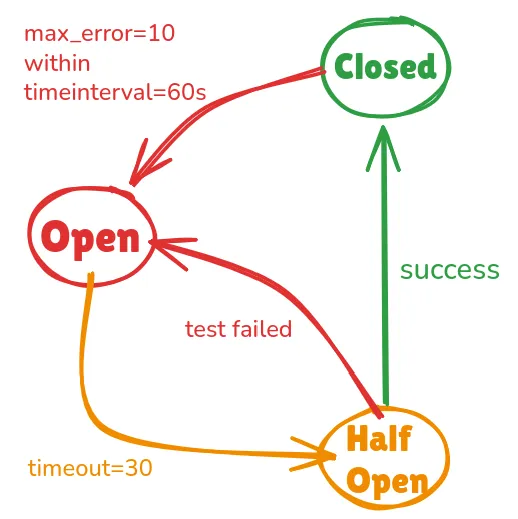
Closed: Closed is a healthy state, it means circuit breaker is close and requests can pass normally.
Open: If KrakenD counts max_error(10 errors) within time interval(60s), it blocks all the requests to the backend server.
Half Open: After the 30-second timeout expires, the circuit breaker enters the Half-Open state. In that state, it allows to pass limited number of requests to test if the backend is actually stable. If the test passes, Circuit Breaker goes in Close state else goes in Open state.
Some unexplained configs in the circuit breaker
**name** : A friendly name to follow this circuit breaker’s activity in the logs.
**log_status_change**: Whether to log the changes of state of this circuit breaker or not. Default to false .
More features provided by KrakenD
Data Manipulation & Aggregation: Merge multiple microservice responses into a single JSON object.
Authentication Offloading: Native JWT validation plugins allow the gateway to reject unauthorized requests at the edge before they even touch your internal networks.
Response Caching: In-memory or Redis caching options.
Comprehensive Metrics: Native integration with Prometheus, Jaeger, OpenTelemetry, and ELK stack for plug-and-play system visibility.
As I implement more features, I’ll update this setup. How are you currently managing your API Gateway configurations? Let me know in the comments!
comments